
Booking flow
This is a simple guide designed to walk you through building a booking path.
1. Get Static Content
The Feed APIs including Get Province Feed API, Get District Feed API, Get Hotel Feed API, Get Room Type Feed API provide you with access content for all of Go2Joy's properties (Hotel, Room Type, etc.).
To keep the Hotel and room Type content fresh and up-to-date, we strongly recommend scheduling to reload our hotel (change) information by weekly refresh.
Allotments and prices are quite dynamic. To improve your booking success rate, we recommend you call Get Room Type List API in real time.
2. Find A Hotel
Get Hotel List API allows you to retrieve all of the available hotel(s) for a given set of search criteria e.g. period of stay, booking type, pricing view, facility, etc.
3. Choose A Room
Get Hotel info API will provide details of hotels quite dynamic (check-in, check-out time, start time & end time of Hourly, Overnight, Daly, etc.) for the expected set of specified hotels.
Get Room Type List API will return all rooms based on each Hotel along with specific rates, fees, and cancellation policies for each room option based on your filter criteria e.g. period of stay, booking type (Hourly, Overnight, Daily).
4. Confirm & Book
Before sending your booking request, confirm the price returned by Calculate Booking Amount API. The response will return all of the final rates in detail.
Submit Create Booking API with the details of the room that you want, the guest information, the period of stay, booking type (Hourly, Overnight, Daily), and your transaction ID.
5. Retrieve Booking Detail
Use the transaction ID provided in Create Booking API to call Get Booking Detail API to receive a response confirming all dates, rates, the room type booked, and the current status of the booking. This flow is called Booking Confirmation.
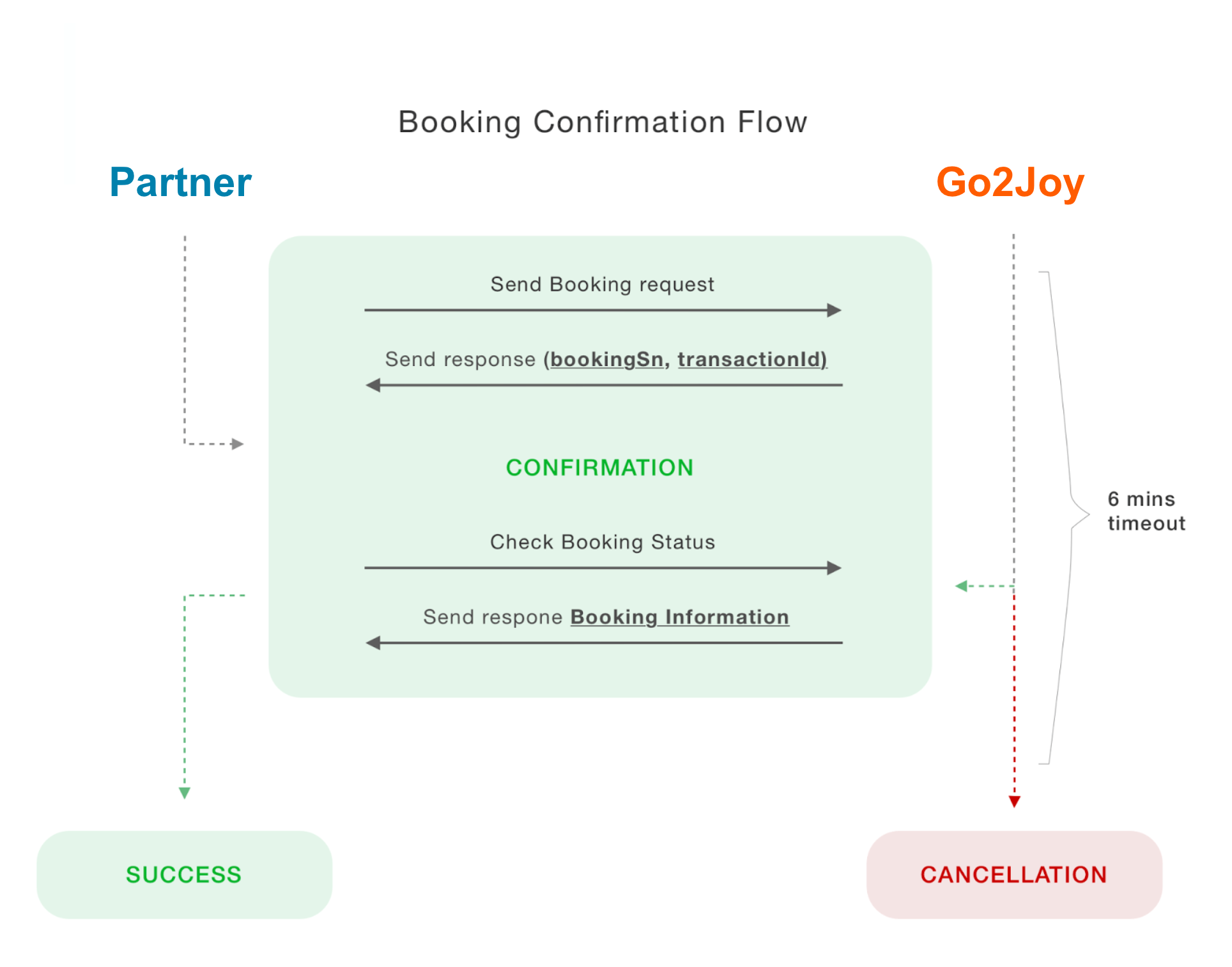
You MUST call Get Booking Detail API after sending your booking request. If exceeds 6 minutes, not receive any request call Get Booking Detail API, the booking will be cancelled.